shp2epa utility conversion

Armando Barreto, a student at the University of Arizona, wrote me about his new free tool will extract geometric data contained in ESRI-shape files into EPANet INP files. shp2epa was designed with an interface similar to dxf2epa for a familiar feeling for the user.
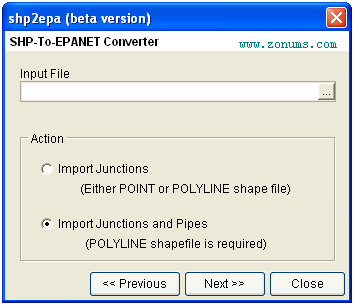
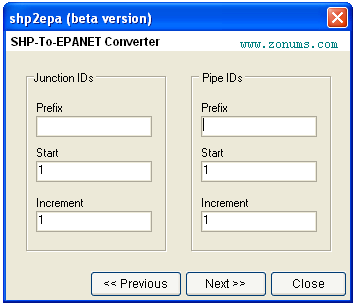
Nodes/Links IDs:
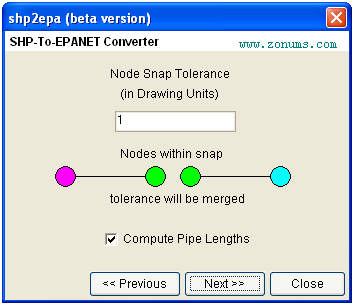
Tolerance:
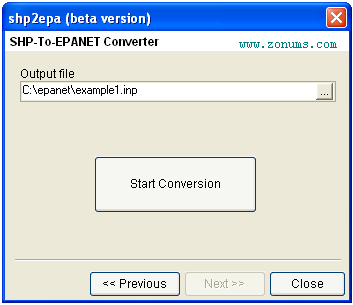
Output file:
For more information and download se Armando’s web site.
Hi all,
trying to access Armandos website I received timeouts. Does anybody know of an alternative site to download this tool?
Best greetings
Sebastian
I have no problem accessing the site – its alive 🙂
Here is a direct download link:
http://www.zonums.com/files/shp2epa.zip
hello to all
thanks for the downloading link, i was looking for it but you facilitated all.
i’m not an english native in case of you find problems in my word.
cordially
Ok, my dial connection in Pakistan does seem to block routing, but I have tested the tool now. Noticable the elevation are not converted. Is there any reason for that? I am aware that z-axis coordinates via gps are more than unreliable, but do indeed give a first approach.
Best wishes
Sebastian
I am trying to convert a pipe.shp to EPANET using shp2epa, but for some strange reason while converting to .inp it does NOT SNAP the nodes at all. In fact ends up creating dplicates!!!
Please help.
Thanks,
Shweta
yeah, ive got the same problem than you shweta !
I have the same problem it does not snap the nodes and makes duplicate, someone can help me and tell me the solution?
thanks
chris
it doesn’t snap at all.. any solution
Indeed, it does not merge nodes for me either. I’m not sure who created this program or how to ask them how to fix it.
I am trying to convert .shp to .inp but it ends up resulting in duplicate nodes of the same properties..
Can any one help me out.. I need it very urgently..
Hello
I’m still a novice on EPANET but I got a problem on the projection system. I wish spend EPANET to EPANET Z without problem. But this is not the case ! Under EPANET, the projection system is the Lambert 2 and under EPANET Z need WGS84. I try to transfer the file .net in .shp with epa2GIS, then to re-project, but it created 5 files .shp. I canג€™t perform the opposite operation shp2epa. Have you any idea?
Thank you in advance!
Same problem! Duplicate nodes!!
Hi All.
I’ve downloaded the app and found that it can only convert one file at a time. What if I am having several shape files such as separate files for junctions, pipes, valves and demands? How to combine them after conversion? Each shape file is giving me separate *.inp file after conversion.
BR, Kafil.
Kafil, I think your best option would be to combine the shape files.
Elad
I had the same problem with the duplicate nodes. I don’t know why, but this application don’t regognize the osnap option. So, to resolve this issue, I’ve used Excel formulas to substitute the duplicated nodes for the first one, based on the coordinates.
Other option you can try is the DXF2EPA, which has the osnap option working well. However, there is a limit of 6 digits on every coordinate or vertice (X or Y). Because of that, my option goes to the SHP2EPA with the substitution of duplicated nodes.
Hope this explination was useful.
Regards,Nuno
Is any other option aside from NUNO DIAZ. this is so frustrating. I am working with 4385 pipes and I have to edit duplicate nodes.
another query, Is this capable of getting information of the pipe such as diameter and length?
I tried converting a polyline shapefile to a .inp file and i get the error message “incorrect type of entity selected for action”. Any advice on how to get around this problem?